Airbnb Guest Portal for Hosts & Vacation Rentals
Digital Guidebook · Guest Portal · AI Concierge
An Airbnb guest portal is one link for the whole stay: Wi-Fi, check-in, house rules, local recommendations, check-out, and contact — plus the TapStay AI Concierge. Guests open it by NFC tap, QR code, or link. No guest app.
Built for Airbnb hosts, vacation-rental owners, and short-term rental managers who want one stay portal instead of repeating the same answers in booking messages.
- No guest app
- Tap · Scan · Link
- Free during the Early Pilot
Free during the Early Pilot · Full feature set · No credit card required
Guest portal
- Wi-Fi
- Check-in
- House rules
- Around You
Ask the Concierge instead of scrolling.
What is a guest portal for Airbnb and vacation rentals?
A guest portal is a single web page for one specific stay, replacing the printed welcome book and the scattered booking messages guests scroll through. It holds the Wi-Fi, check-in information, house rules, local recommendations and check-out details in one place.
TapStay combines all three layers in one browser-based portal: a digital guidebook guests can browse, local discovery with host picks and verified nearby places, and an AI Concierge that answers from the stay information you saved. See how the digital guidebook and the guest portal differ.
It is a guest-experience layer, not an operations platform — do you need a PMS for guest communication? compares the two categories.
Not every product called a “guest portal” is the same thing. Many PMS and booking tools use “guest portal” for reservation tasks — payments, rental agreements, ID checks, or upsells like early check-in. TapStay is different: it is the stay information portal guests open for Wi-Fi, check-in guidance, house rules, local recommendations and in-stay answers — via NFC, QR or link — without a guest app. It does not replace your PMS, Airbnb, or channel manager. For a vendor-neutral map of these overlapping categories, see the guest portal vs PMS landscape.
When hosts search for an Airbnb guest portal, they often find reservation tools such as payments, ID checks, or upsells. TapStay is the other kind: a stay information portal guests use during the trip. It does not replace Airbnb Messaging, your PMS, or your channel manager.
Looking for how to set that stay portal up? Set up your property & Guest Portal.
A free guest portal for every property — during the Early Pilot.
This is not a seven-day trial and not a stripped-down demo. TapStay is completely free through January 1, 2027: full access, unlimited properties, and no credit card required.
So a free Airbnb guest portal, a free vacation rental guest portal or a free guest portal for short-term rentals all mean the same thing here: the real product, on every property. The digital experience goes live by link or QR code straight away. After the pilot, your first active property remains free forever. Plaque ordering will become available after the Early Pilot.
- Full feature set
- No credit card
- No guest app
Guests don't want to search. They want the answer.
Stay information usually lives in five places at once: the booking thread, a PDF, a screenshot, a laminated page on the fridge and the host's memory. When a guest is standing at the door with luggage, none of that is easy to find.
A guest portal collapses that into one page you update once — and the same page answers the same five questions for every guest, every week.
- 1
“What's the Wi-Fi?”
- 2
“How do we check in?”
- 3
“What time is check-out?”
- 4
“Where should we eat nearby?”
- 5
“What are the house rules?”
Tap, scan or link — one portal.
Guests reach the same guest portal three ways, so nobody is locked out by an old phone or a missing message. See how TapStay separates public stay access from protected operational details.
Deciding between the three? NFC vs QR vs link for vacation rentals compares them side by side.
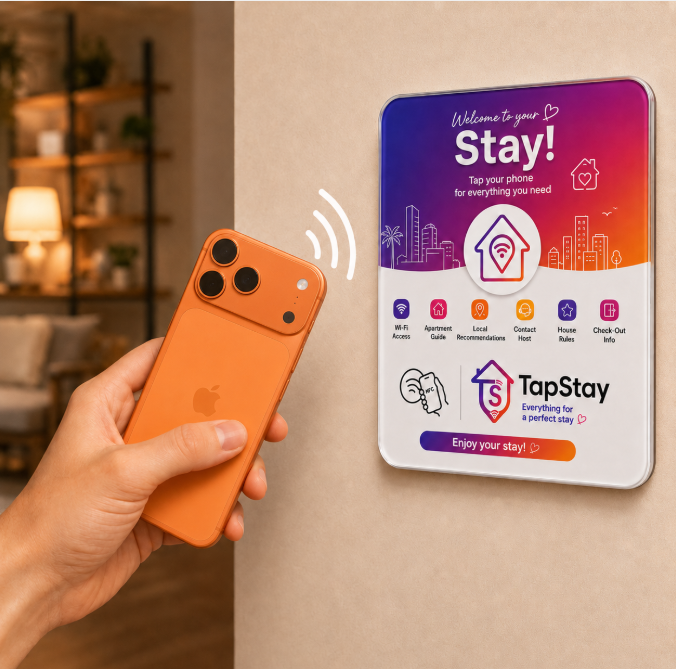
Tap the TapStay plaque
The NFC plaque lives on the wall inside the property. A guest holds their phone near it and the guest portal opens in the browser — nothing to install, nothing to charge.
NFC · inside the property
Tap, scan and link all open the same guest portal — one page to keep updated, three ways in.
Contactless check-in for Airbnb and vacation rentals
A TapStay guest portal can support contactless check-in by giving guests one mobile-friendly place for the arrival instructions, check-in details and property information you provide — alongside Wi-Fi, house rules, the digital guidebook and the AI Concierge for in-stay questions. Instead of an in-person handoff or a chain of booking messages, guests open the same page before they arrive and at the door, so self check-in for Airbnb and vacation rentals becomes calmer and more predictable. TapStay itself is not a smart-lock or door-access system; it centralises the host-provided information that makes a smooth, contactless arrival possible.
Everything a guest needs, in one place.
Arrival, Wi-Fi, house rules, local recommendations, check-out and contact — switch between the examples to see the kind of information a TapStay guest portal holds.
Still gathering your content? Start from the free Airbnb welcome book checklist & template.
Arrival & check-in
The first thing a guest needs at the door: how to get in, where to park and what happens on arrival.
- Check-in time and instructions
- Entry and key details
- Parking and access notes
Presentation example. You decide what goes into your own guest portal.
Browse when you want. Ask when you don't.
The portal is browsable, but some guests would rather just ask. The Concierge answers in natural language from the stay information you saved, and can hand the guest back to the matching portal card.
If a detail isn't in the stay information, it doesn't invent a host policy — it says so and can point the guest to you.
TapStay Concierge
Answers from your stay information
What's the Wi-Fi?
Here are the Wi-Fi details saved for your stay — you can copy the password from the Wi-Fi card.
Local recommendations built into the stay.
Around You pairs your host picks with verified nearby places across the categories guests actually use — restaurants, coffee, attractions, breakfast, bars, groceries, outdoors, shopping, pharmacy and transport. New to curating Host Picks? Start with the writing method.
Host picks
Your own favourites for the neighbourhood — the coffee place you send everyone to, the restaurant worth booking, the walk that makes the trip.
Verified nearby
Live verified nearby places for the selected category, shown with the trustworthy details that exist — such as distance, address, Maps link, website or phone.
- Restaurants
- Coffee
- Attractions
- Groceries
- + 6 more categories
Guests can also switch discovery to Near me when they are away from the property — with an explicit permission step first. See how Near me works
A guest portal, a printed book, or booking messages.
Managing more than a handful of properties? Read the data-backed guide to reducing repetitive guest messages, with published case studies and a workload calculator.
| Capability | TapStay Guest Portal | Printed / PDF book | Booking messages only |
|---|---|---|---|
| One place for the whole stay | Yes | No | No |
| NFC access inside the property | Yes | No | No |
| QR access | Yes | Yes | No |
| Shareable link before arrival | Yes | No | Yes |
| Editable without reprinting | Yes | No | Yes |
| AI Concierge | Yes | No | No |
| Local recommendations | Yes | Yes | No |
| No guest app | Yes | Yes | No |
| Works independently across booking channels | Yes | Yes | No |
Comparison of formats, not companies. TapStay is independent and not affiliated with any booking platform.
Browser portal vs. a native guest app
A browser-based guest portal opens from a direct link, QR code, or NFC tap. Guests do not need to visit an app store, install software, or keep an app after the stay.
Native apps can make sense for resorts, loyalty programs, repeat guests, push notifications, or deeper device integrations. For short vacation-rental stays, a browser portal keeps access lightweight and immediate.
NFC vs QR vs link for vacation rentals compares the three ways guests can open a browser portal.
| Capability | Browser Guest Portal | Native Guest App |
|---|---|---|
| Download required | No — opens in the phone's browser | Yes — guests download from an app store |
| App Store / Play Store | Not required | Required for distribution and updates |
| Opens from QR/NFC/link | Opens directly from a link, QR code or NFC tap | Usually requires a deep link after install |
| Cross-platform | Works on any phone with a browser | Needs separate iOS and Android versions |
| Updates | Host changes appear instantly for every guest | Guests must update the app to see changes |
| Best fit | Short vacation-rental stays and independent hosts | Resorts, loyalty programs and repeat-guest programs |
| Push notifications | Not typically available in the browser | Supported via native push |
| Guest installation friction | Low — tap, scan or click and go | Higher — download, install and often sign in |
Both approaches can work; the right choice depends on the guest journey. For most Airbnb and vacation-rental stays, a browser portal removes the step that slows guests down.
One property, set up once.
Add your Wi-Fi, check-in details, house rules, check-out steps and favourite local places once. When something changes — a new code, a new coffee place — it is a quick update, not a reprint.
Many stays, one standard.
Every property gets the same guest portal structure, so guests get a consistent experience across the portfolio and your team knows exactly where information lives.
Guest portal questions, answered.
Create your guest portal free during the Early Pilot.
Wi-Fi, arrival and check-in, house rules, local recommendations, check-out and the AI Concierge in one mobile portal. Publish it and share by link or QR code today — free through January 1, 2027, with unlimited properties and no credit card.
Free during the Early Pilot · Full feature set · No credit card required · No guest app
Guests can also open the portal by tapping the official TapStay plaque, and you can see what is included free during the Early Pilot before you start.